Install PHP Debug extension in VS Code (by Xdebug.org).
Create .vscode/launch.json at project root:
json
{ "version":"0.2.0","configurations":[{
  "name":"Listen for Xdebug","type":"php","request":"launch","port":9003
}]}
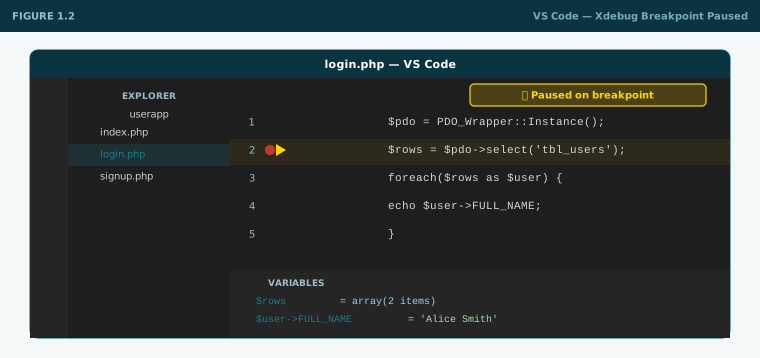
Run & Debug → "Listen for Xdebug" → add a breakpoint → reload browser → execution pauses.
Figure 1.2— VS Code paused on a PHP breakpoint, Variables panel showing live values
Task 1.3Verify MySQL 8.4.3 in Workbench
Connect to localhost:3306. Run SELECT VERSION(); — confirm 8.4.3. Run SHOW DATABASES; — confirm the connection works.
Task 1.4Chrome DevTools orientation
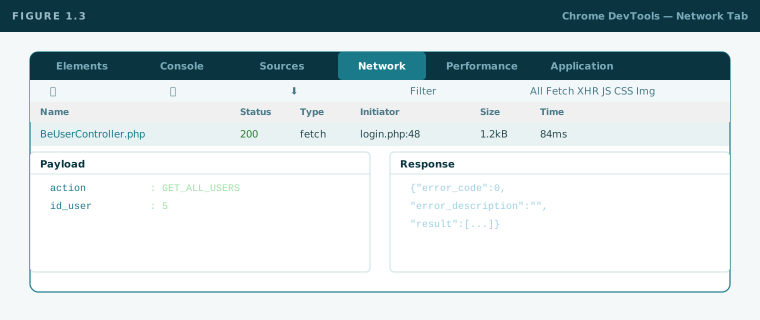
Press F12. Locate and use: Elements (live DOM), Console (JS output and errors), Network (every HTTP request — check Payload and Response tabs on AJAX calls), Sources (JS debugger with breakpoints).
Figure 1.3— Chrome DevTools Network tab: POST request selected, Payload showing form data, Response showing JSON
✅Checkpoint 1
phpinfo() shows PHP 8.1.32, Server API = FPM/FastCGI
SELECT VERSION() returns 8.4.3
Xdebug pauses on a VS Code breakpoint
You can find Console, Network, and Elements in Chrome DevTools and know what each does
Play 1 of 16
Play 2 →
Play 02 — Foundations
HTML & CSS Foundations
The three screens you build here — Login, Signup, User List — are the running example for the entire playbook. Every play extends these same files.
Document structure
DOCTYPE · html · head · body
Every valid HTML5 page starts here. Know what each element owns.
Forms — most important
action · method · name
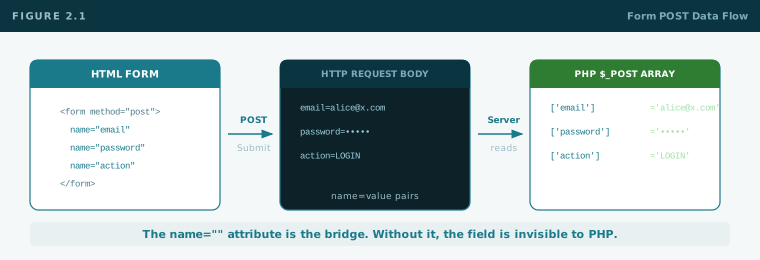
The name attribute is the bridge between HTML and PHP. Without it the field is invisible to the server.
Semantic elements
header · nav · main · section · table
Use the right element for the right purpose. A form is not a div.
CSS basics
Selectors · Box model · Flexbox
The box model (margin / border / padding / content) governs all layout. Draw it from memory.
Why the name attribute matters
html + php
<form action="handler.php" method="post">
<input type="email"name="email">
<input type="password"name="password">
<input type="hidden"name="action" value="LOGIN">
</form>
// PHP reads by the same name key:$email = $_POST['email'];
$action = $_POST['action']; // "LOGIN"
Figure 2.1— Form POST flow: HTML form → HTTP request body (name=value pairs) → PHP $_POST array
The three screens — your running example
These files start as raw HTML here and get extended every play. Do not create new pages — improve these same files throughout the playbook.
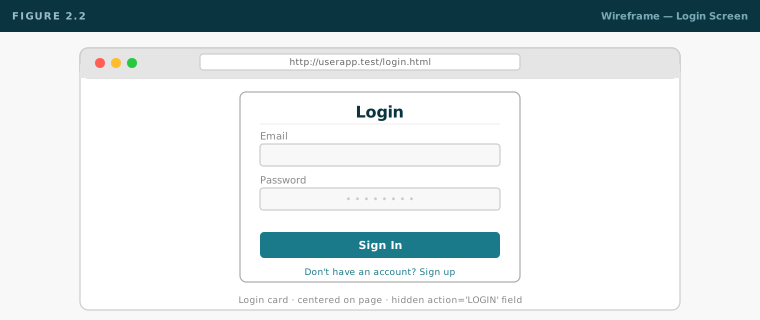
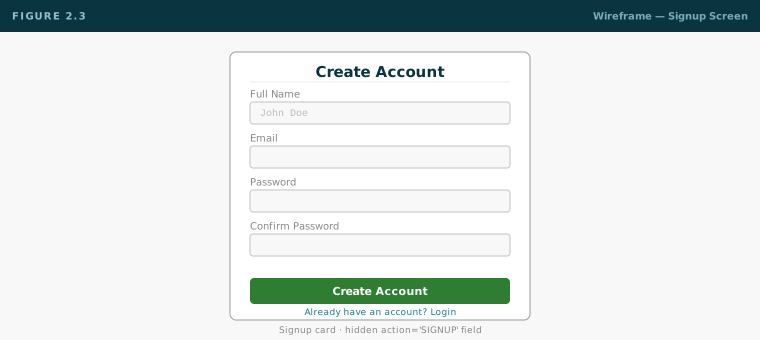
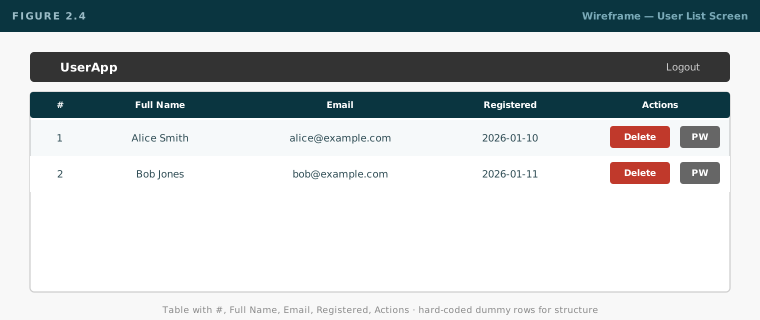
Figure 2.2— Wireframe: Login screen — centered card, email + password, submit button, signup link belowFigure 2.3— Wireframe: Signup screen — full name, email, password, confirm passwordFigure 2.4— Wireframe: User List — table with #, Full Name, Email, Registered, Actions; Delete + Change PW buttons per row
Tasks
Task 2.1Login div — raw HTML, no styling
Create login.html: wrapping div, h2 "Login", form (action="#" method="post") with email, password, hidden action="LOGIN", submit button. Add "Don't have an account? Sign up" link to signup.html.
Task 2.2Signup div — raw HTML, no styling
Create signup.html: full name, email, password, confirm password. Hidden action="SIGNUP". "Already have an account? Login" link.
Task 2.3User list div — raw HTML, no styling
Create users.html: h2 "Users", table with columns #, Full Name, Email, Registered, Actions. Two hard-coded rows with dummy data. Actions cell: Delete + Change Password buttons (no wiring yet). Logout link.
✅Checkpoint 2
All three .html files open in Chrome without errors
Can explain what name, action, and method do on a form
Can explain how a posted field reaches PHP via $_POST
Can draw the CSS box model from memory
← Play 1
Play 2 of 16
Play 3 →
Play 03 — Foundations
Bootstrap 3 & 4
Bootstrap 3 and 4 are used across different parts of the ROBATEKS stack. You need to be comfortable with both. All libraries are vendored locally — no CDN, ever.
No CDN. Download Bootstrap 3 (or 4), jQuery, and DataTables. Serve them from /libs/plugins/. This is a hard rule on all ROBATEKS projects.
Bootstrap 3 vs Bootstrap 4 — the key differences
BS3 Bootstrap 3
BS4 Bootstrap 4
Grid prefix
col-md-6
col-md-6 (same) + col-lg, col-xl
Push/pull
col-md-push-3
Use flexbox order utilities
Spacing utilities
None built-in (use custom CSS)
mt-3, mb-3, px-4 etc.
Flexbox
Not in grid by default
Grid is flexbox-based; d-flex, align-items-center
Cards
Use .panel or .well
.card, .card-body, .card-title
Form inputs
.form-control
.form-control (same)
Navbar
.navbar-default, toggle via JS
.navbar-expand-md, .navbar-dark
JS dependency
jQuery required
jQuery required (Popper.js for dropdowns)
Tables
.table-condensed
.table-sm
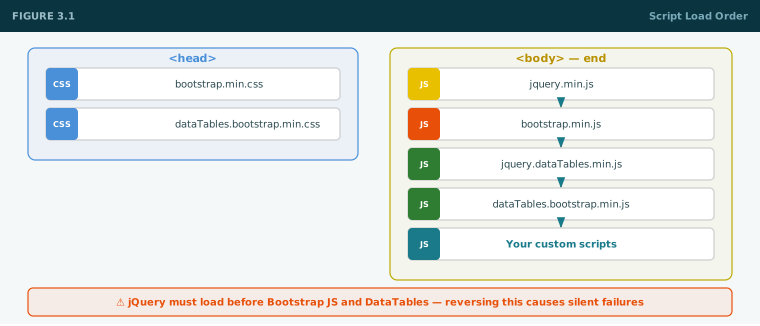
Script load order — always follow this
html
<!-- In <head> -->
<link rel="stylesheet" href="libs/plugins/bootstrap/css/bootstrap.min.css">
<link rel="stylesheet" href="libs/plugins/datatables/css/dataTables.bootstrap.min.css">

<!-- At end of <body> -- order is critical -->
<script src="libs/plugins/jquery/jquery.min.js"></script>
<script src="libs/plugins/bootstrap/js/bootstrap.min.js"></script>
<script src="libs/plugins/datatables/js/jquery.dataTables.min.js"></script>
<script src="libs/plugins/datatables/js/dataTables.bootstrap.min.js"></script>
<!-- Your scripts last -->
⚠️jQuery must always load before Bootstrap JS and DataTables. Reversing this causes silent failures that are hard to trace in the Network tab.
Figure 3.1— Script load order diagram: Bootstrap CSS (head) → DataTables CSS (head) → jQuery → Bootstrap JS → DataTables JS → Custom JS (all end of body)
Key Bootstrap 3/4 concepts
Grid system
12 columns · container · row · col-md-6
col-md-6 = 50% on medium+ screens, stacks on mobile. Always wrap cols inside .row inside .container (or .container-fluid).
Forms 3 & 4
form-group · form-control · form-label
BS3 uses .form-group wrapper. BS4 keeps .form-group but adds spacing utilities. Always use .form-control on inputs.
Modals 3 & 4
modal · modal-dialog · modal-content
BS3: $('#myModal').modal('show'). BS4: same jQuery approach. Use for Change Password and confirmations.
Classes the same. BS4 adds .table-sm (BS3 called it .table-condensed). DataTables requires a proper <thead>.
Buttons 3 & 4
btn · btn-primary · btn-danger · btn-sm
Same class names across BS3 and BS4. .btn-block in BS3; use .d-block.w-100 in BS4.
Tasks
Task 3.1Apply Bootstrap 3 to Login
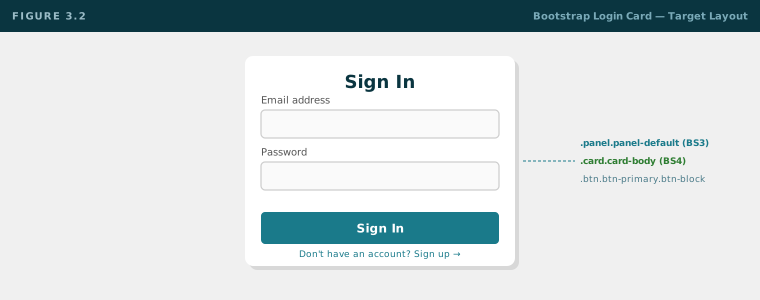
Take login.html from Task 2.1. Add Bootstrap 3 CSS/JS from local libs. Wrap form in a .panel.panel-default, centered on the page. Apply .form-group, .form-control, .btn.btn-primary.btn-block. Result must match Figure 3.2.
Swap Bootstrap 3 for Bootstrap 4. Replace .panel with .card.card-body. Replace .btn-block with .btn.btn-primary.d-block.w-100. Centre using flexbox: d-flex align-items-center justify-content-center on body with min-vh-100. Note every class that changed.
Task 3.3Apply Bootstrap to Signup
Apply the same Bootstrap 4 treatment to signup.html. Add <small class="form-text text-muted"> hint under the password field.
Task 3.4Apply Bootstrap to Users List (table only — DataTables in Play 5)
Take users.html. Apply .table.table-striped.table-hover.table-bordered. Add navbar. Give the table id="users-table" and ensure <thead> has <th> per column. Add the Change Password Bootstrap modal. Do not init DataTables yet — that is Play 5.
Task 3.5Document every Bootstrap 3 → 4 class change you made
Write a brief personal cheat-sheet of the class names that differ between BS3 and BS4. You will refer to this when working on legacy vs new features.
✅Checkpoint 3
All libs load from /libs/plugins/ — zero CDN requests in Network tab
Can explain the key differences between BS3 and BS4 panel/card, spacing, and flexbox utilities
Login and signup display as styled centered forms in both versions
You can open a Bootstrap 3 modal with $('#myModal').modal('show')
You know why jQuery must load before Bootstrap JS
← Play 2
Play 3 of 16
Play 4 →
Play 04 — Foundations
JavaScript & jQuery
Master vanilla JS fundamentals, then jQuery for DOM work and AJAX. Learn the response shape every feature in this stack uses — before you touch any PHP.
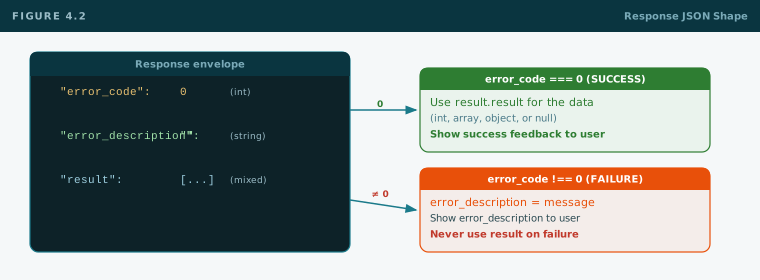
error_descriptionstringEmpty on success. Human-readable on failure — show this in the UI.
resultmixedActual data: int, object, array, or null. Only use when error_code === 0.
javascript
// Always parse, always check error_code firstvar result = JSON.parse(response);
if (result.error_code === 0) {
// success — data is in result.result
} else {
alert(result.error_description);
}
Figure 4.2— Response JSON: error_code 0 → use result.result; non-zero → show error_description to user
Tasks
Task 4.1Client-side validation on Signup
Add a script to signup.html: preventDefault on submit, check password === confirm password, alert on mismatch, log form data as JSON string to Console on match.
Task 4.2Simulate an AJAX response
In users.html, declare a fake JSON response string, parse it, check error_code, if 0 loop through result.result with forEach and append a <tr> to #users-tbody for each user.
Task 4.3Event delegation on the fake table
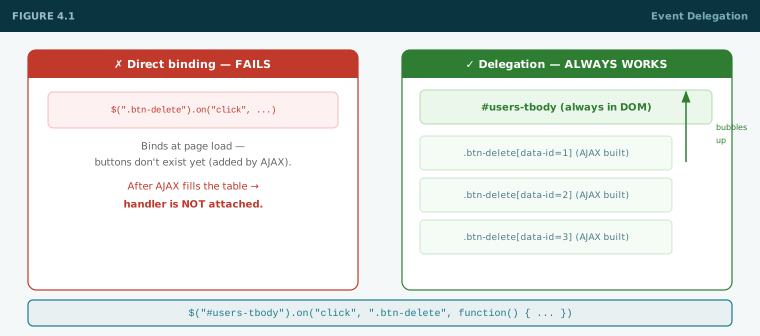
Add a delegated click on #users-tbody for .btn-delete. Read data-id and alert "Delete user ID: X". Call LoadUsers() a second time — verify the handler still fires on rebuilt rows (proving delegation works after DOM refresh).
Task 4.4$.ajax practice
Write a $.ajax() call (pointing to a test PHP file that returns JSON) and log the parsed result. Practice the Network tab: see the POST payload, see the JSON response.
✅Checkpoint 4
Can explain JSON.parse vs JSON.stringify and when each is used
Understand direct binding vs event delegation — and why dynamic elements need delegation
Can make a $.ajax POST and check error_code in the response
Know the { error_code, error_description, result } response shape cold
← Play 3
Play 4 of 16
Play 5 →
Play 05 — Foundations
DataTables & AJAX Dynamic Load
DataTables transforms a plain HTML table into a sortable, searchable, paginated widget. But here you go further: no data is in the HTML at render time. The table starts empty. An AJAX call fills it. This is how every real feature in the stack works.
What DataTables needs to work
HTML requirements
id · thead with th · empty tbody
DataTables reads column headers from <thead><th>. The <tbody> starts empty — AJAX fills it. Always give the table a unique id.
Destroy before rebuild
Always .destroy() first
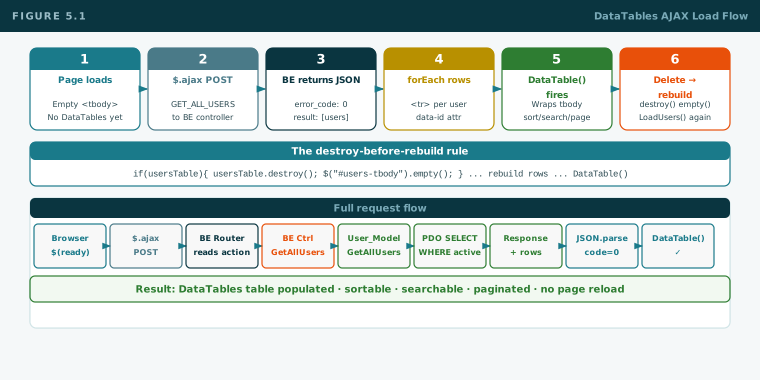
If you call DataTable() on an already-initialised table, it breaks with duplicate headers. Always destroy the old instance and empty tbody before rebuilding.
The AJAX dynamic load pattern — frontend
javascript
var usersTable = null; // holds the DataTables instance$(document).ready(function() {
LoadUsers(); // fire immediately on page load
});
functionLoadUsers() {
// 1. Destroy old DataTable instance if it existsif (usersTable !== null) {
usersTable.destroy();
$("#users-tbody").empty();
usersTable = null;
}
// 2. AJAX call to the BE controller$.ajax({
url: "path/to/BeUserController.php",
method: "POST",
data: { action: "GET_ALL_USERS" },
success: function(response) {
var result = JSON.parse(response);
// 3. Always check error_code firstif (result.error_code !== 0) {
alert(result.error_description);
return;
}
// 4. Build rows from result.result arrayvar counter = 1;
result.result.forEach(function(u) {
var row = "<tr>"
+ "<td>" + counter++ + "</td>"
+ "<td>" + u.FULL_NAME + "</td>"
+ "<td>" + u.EMAIL + "</td>"
+ "<td>" + (u.DATE_CREATED || "—") + "</td>"
+ "<td>"
+ "<button class='btn btn-danger btn-sm btn-delete' data-id='" + u.ID + "'>Delete</button> "
+ "<button class='btn btn-default btn-sm btn-change-pw' data-id='" + u.ID + "'>Change PW</button>"
+ "</td>"
+ "</tr>";
$("#users-tbody").append(row);
});
// 5. Re-init DataTables AFTER rows are in the DOM
usersTable = $("#users-table").DataTable({
pageLength: 10,
order: [[1, "asc"]]
});
}
});
}
// Event delegation on tbody — works for all dynamically built rows$("#users-tbody").on("click", ".btn-delete", function() {
var id = $(this).data("id");
if (!confirm("Delete this user?")) return;
// ... AJAX delete call, then LoadUsers()
});
The backend side — what GET_ALL_USERS must return
The PHP handler must echo a JSON string with the { error_code, error_description, result } envelope. The result field is an array of objects — one per user row. The FE loops over it with forEach.
<tbody id="users-tbody"></tbody> is empty. DataTables not yet initialised. User sees a loading state or spinner.
2
$(document).ready fires LoadUsers()
Immediately on page load, the JS function posts { action: "GET_ALL_USERS" } to the BE controller via $.ajax.
3
BE controller handles GET_ALL_USERS
Router reads the action, calls User_Model::GetAllUsers(), model runs SELECT ... WHERE IS_ACTIVE=1 AND DELETED=0, returns Response(SUCCESS, $rows). Router echoes json_encode($response).
4
JS receives JSON, checks error_code
JSON.parse(response) → check error_code === 0. If not 0, show error_description. If 0, proceed.
5
JS builds <tr> rows and appends to tbody
result.result.forEach() loops over the user array. Each iteration builds a <tr> string with the user data and action buttons (with data-id attributes). Appended to #users-tbody.
6
DataTables initialised on the now-populated table
$("#users-table").DataTable({ ... }) runs after forEach is done. Table now has search, sort, and pagination. Instance stored in usersTable.
7
User deletes a row → LoadUsers() called again
Delete AJAX succeeds. usersTable.destroy() + empty() + LoadUsers() repeats steps 2–6. Table refreshes in place. No page reload.
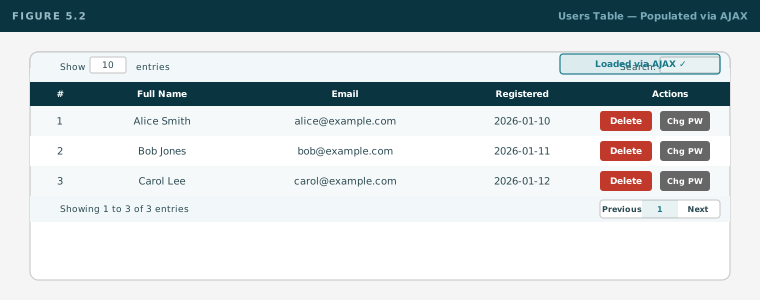
Figure 5.1— DataTables AJAX load flow: empty HTML → $.ajax → BE returns JSON → forEach builds rows → DataTable() initialisedFigure 5.2— Screenshot: Users table populated via AJAX with DataTables controls active (search, sort, pagination, action buttons)
Tasks
Task 5.1Add DataTables to users.html with static rows
Take your users.html from Play 3. Give the table id="users-table", ensure <thead> has a <th> per column. Leave the two dummy rows in the tbody. Init DataTables on it in a script block. Verify search, sort, and pagination appear.
Task 5.2Switch to AJAX dynamic load
Remove the hard-coded dummy rows. Add a script that on $(document).ready:
Declares a fake JSON response matching the exact shape above (error_code 0, result array).
Checks error_code.
Loops with forEach and appends rows with Delete and Change PW buttons.
Initialises DataTables after the loop.
The table should look identical to Task 5.1 but the rows come from JS, not HTML.
Task 5.3Implement LoadUsers() with destroy/rebuild
Wrap the AJAX + DataTables logic in a LoadUsers() function. Call it on ready. Add a "Refresh" button that calls LoadUsers() again. Verify the table destroys and rebuilds cleanly with no duplicate headers.
Task 5.4Wire the Delete button with delegation
Add a delegated click handler on #users-tbody for .btn-delete. On click: confirm dialog, then (for now) remove the row from the fake data array and call LoadUsers() to refresh. Verify the DataTables instance is not duplicated.
Task 5.5Observe the Network tab during every operation
Open DevTools → Network. Reload the page. Watch the AJAX POST appear. Inspect its Payload (action=GET_ALL_USERS). Inspect its Response (the JSON). Do this for every AJAX call you make from now on — this is your primary debugging tool.
✅Checkpoint 5
DataTables initialises on a table with a proper <thead> and <th> elements
Table starts empty in HTML — rows are added by JS via forEach, never hardcoded
DataTables instance is destroyed and tbody emptied before every rebuild
Delete button uses event delegation on tbody, not direct binding
Network tab shows the POST request and JSON response for every AJAX call
Can explain all 7 steps of the page-load-to-populated-table flow
← Play 4
Play 5 of 16
Play 6 →
Play 06 — Foundations
PHP 8.1 & OOP
MV2C is entirely object-oriented. Write a working example of each OOP concept before moving on. The Singleton pattern and Autoloader are non-negotiable — learn them cold.
OOP concepts — learn every one
Concept
What to know
Class & object
class Foo{}, properties, methods, new, $this
Visibility
public, private, protected
Constructor
__construct(). PHP 8 constructor promotion.
Static
static props/methods, self::, ClassName::
Inheritance
extends, override, parent::__construct()
Abstract
abstract class, abstract function — defines required slots subclasses must fill
Interface
interface, implements
Return types
: string, : bool, : void, : Response
Exceptions
try/catch/finally, throw new Exception()
Namespaces
namespace App\Models; + use App\Models\User;
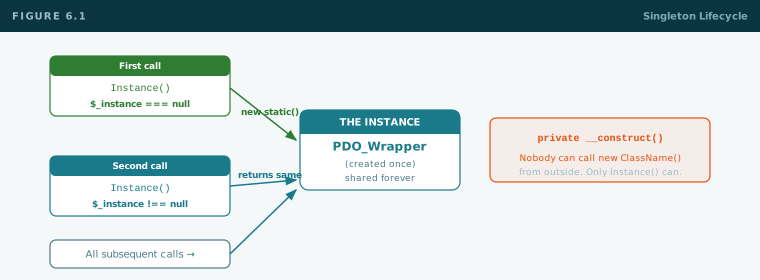
The Singleton pattern — learn this cold
php
classExample {
private static ?self$_instance = null;
public static functionInstance(): static {
if (self::$_instance === null)
self::$_instance = new static();
returnself::$_instance;
}
private function__construct() {} // private: no new Example() from outside
}
// Usage — always through Instance(), never with new:Example::Instance()->DoSomething();
Figure 6.1— Singleton lifecycle: first call creates instance; all subsequent calls return the same object
Autoloader rule: namespace must match folder path exactly. WebApplication\MVC\Models\User_Model → loads WebApplication/MVC/Models/User_Model.php
Tasks
Task 6.1OOP practice — shapes
Abstract class Shape with abstract area(): float. Circle and Rectangle extend it. Instantiate and print areas.
Task 6.2Singleton practice
Counter singleton with Increment() and GetCount(). From two separate functions call Counter::Instance()->Increment() and verify count accumulates.
Task 6.3Password hashing
Hash with PASSWORD_DEFAULT, verify correct and wrong inputs. Refresh twice — notice hash changes. Understand why (random salt).
Task 6.4Xdebug on OOP
Breakpoint inside Counter::Increment(). Call in a loop. Step through and watch $this->count increment in VS Code Variables panel.
✅Checkpoint 6
Can write a class with public/private/static from memory
Can implement the Singleton pattern from memory — no notes
Understand autoloader namespace → file path rule and can explain it
Can hash and verify a password and explain why the hash changes every call
Xdebug lets you inspect a variable inside a running PHP method
← Play 5
Play 6 of 16
Play 7 →
Play 07 — Foundations
MySQL 8.4 & PDO
The data layer. The schema you create here is used for the entire playbook. The conventions you adopt here are permanent — they match the production stack.
Column conventions — permanent
Convention
Rule
Table prefix
tbl_
Column names
UPPERCASE
Soft delete
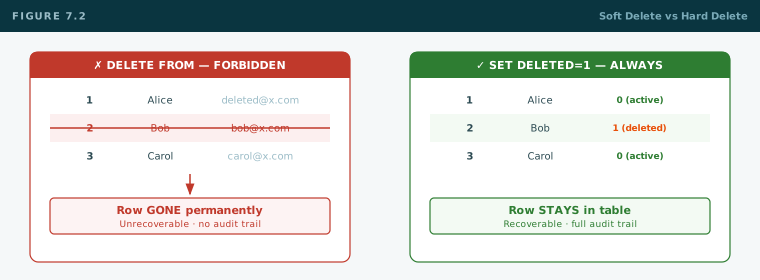
DELETED = 1 — never run DELETE FROM
Active filter
WHERE IS_ACTIVE = 1 AND DELETED = 0
Insert timestamp
DATE_CREATED = NOW() on insert only
Update timestamp
DATE_MODIFIED = NOW() on every update
Unassigned FK
ID = -1, never NULL
Charset
utf8mb4 everywhere
Create the database — your curriculum schema
sql
CREATE DATABASE IF NOT EXISTS userapp
CHARACTER SET utf8mb4 COLLATE utf8mb4_unicode_ci;
USE userapp;
CREATE TABLE tbl_users (
ID INTNOT NULL AUTO_INCREMENT PRIMARY KEY,
FULL_NAME VARCHAR(150) NOT NULL,
EMAIL VARCHAR(150) NOT NULL,
PASSWORD_HASH VARCHAR(255) NOT NULL,
IS_ACTIVE TINYINT(1) NOT NULL DEFAULT1,
DELETED TINYINT(1) NOT NULL DEFAULT0,
DATE_CREATED DATETIMENULL,
DATE_MODIFIED DATETIMENULL,
UNIQUE KEY uq_email (EMAIL)
) ENGINE=InnoDB DEFAULT CHARSET=utf8mb4;
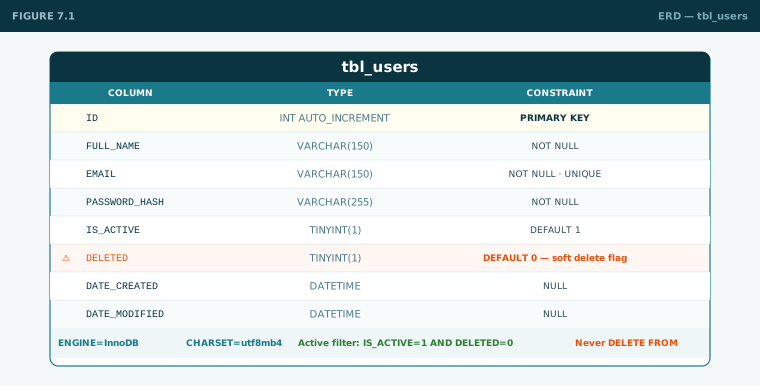
Figure 7.1— ERD: tbl_users with all columns, types, constraints, and charsetFigure 7.2— Soft delete vs hard delete: DELETED=1 keeps the row recoverable; DELETE FROM removes it permanently
PDO — always bound parameters
php
$pdo = newPDO("mysql:host=localhost;dbname=userapp;charset=utf8mb4","root","",[
PDO::ATTR_ERRMODE => PDO::ERRMODE_EXCEPTION,
PDO::ATTR_DEFAULT_FETCH_MODE => PDO::FETCH_OBJ,
PDO::ATTR_EMULATE_PREPARES => false
]);
// Always bound params — never string concatenation:$stmt = $pdo->prepare("SELECT * FROM tbl_users WHERE EMAIL=:email AND DELETED=0");
$stmt->execute([":email"=>$email]);
$user = $stmt->fetch();
// Soft delete — never DELETE FROM:$pdo->prepare("UPDATE tbl_users SET DELETED=1,DATE_MODIFIED=NOW() WHERE ID=:id")->execute([":id"=>$id]);
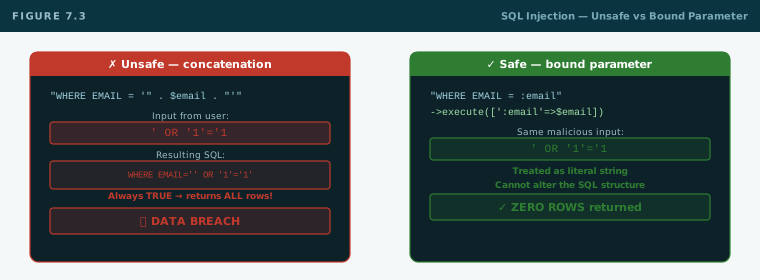
Figure 7.3— SQL injection: unsafe concatenation vs bound parameter — how injection breaks and how binding stops it
Tasks
Task 7.1Create the database and table
Run the SQL above in Workbench. Verify the table appears with all columns.
Task 7.2PDO insert and select test
Connect with all three PDO options. Insert a test user (hashed password). SELECT and print. UPDATE IS_ACTIVE=0. Soft-delete. SELECT with active filter — user must not appear.
Write unsafe concatenated query, try ' OR '1'='1, observe result. Switch to prepared statement, repeat — verify safe. Delete unsafe version immediately after.
Task 7.4Xdebug on a PDO query
Breakpoint on $stmt->execute(). Inspect $stmt in VS Code. Step over and inspect the fetched result object.
✅Checkpoint 7
tbl_users exists with all columns and conventions
SELECT / INSERT / UPDATE with bound parameters only — never concatenation
Soft delete only — never DELETE FROM
Can explain SQL injection and why bound parameters prevent it
← Play 6
Play 7 of 16
Play 8 →
Play 08 — The Naive Build
The Naive App
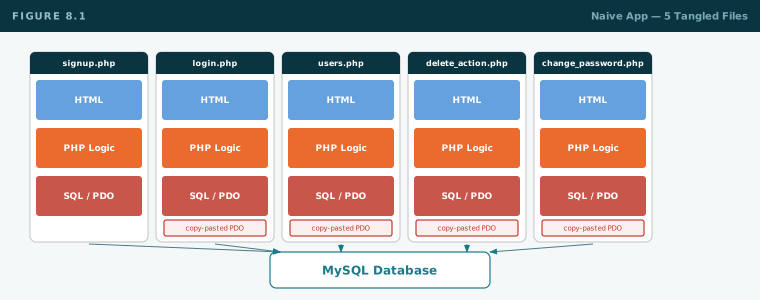
Build the entire user app the "obvious" way — PHP mixed into HTML, raw PDO in every file, no classes. Intentionally bad. Every problem you hit must be felt, not read.
Rules for this play: deliberately bad. PHP logic at the top of every page. Query DB directly. Mix HTML, SQL, and PHP freely. Make it work — ugliness is the point.
Figure 8.1— Naive app structure: 5 standalone .php files each with HTML + PHP logic + raw SQL all tangled together
Tasks
Task 8.1signup.php — naive
PHP block at top reads $_POST, validates, hashes password, checks duplicate email, inserts, redirects. Bootstrap HTML form below.
Task 8.2login.php — naive
PHP at top: SELECT user, password_verify, session_start(), write $_SESSION, redirect. Show inline error on failure.
Task 8.3users.php — naive (with DataTables)
Check $_SESSION at top, redirect if absent. SELECT all active users. Echo Bootstrap table in PHP foreach. Give table id="users-table". Init DataTables on it. Each row has a Delete button posting to delete_action.php. No AJAX yet — full page reload on delete.
Task 8.4delete_action.php — naive
Read $_GET['id']. UPDATE DELETED=1. Redirect back to users.php.
Task 8.5change_password.php — naive
Verify session. Show form. On POST: validate, hash, UPDATE, redirect.
Keep a running list while building. Count the copy-pasted PDO blocks. Write down at least 5 specific problems you notice — you will map them in Play 9.
✅Checkpoint 8
All five features work end to end
DataTables initialises on the users table (even though rows are server-rendered)
Written list of at least 5 specific problems noticed while building
← Play 7
Play 8 of 16
Play 9 →
Play 09 — The Naive Build
Why It Breaks
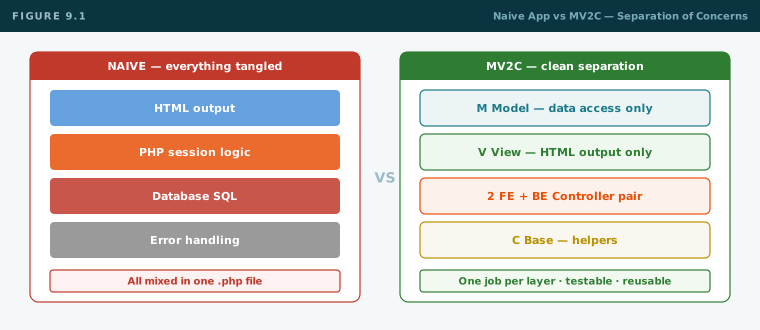
Map every problem you felt in Play 8 to the MV2C solution that fixes it. These wants are the architecture — every piece in the next plays exists because of what you just experienced.
Your problems → MV2C solutions
Problem you felt
MV2C solution
PDO connection copy-pasted in every file
PDO_Wrapper singleton — one connection, one place
HTML, SQL, and logic all tangled together
M / V / 2 / C separation — each layer has one job
No consistent success/error format
Response envelope — every operation returns the same shape
Full page reload on every action
AJAX — update only the affected DOM element (no reload)
DataTables loses state on every page reload
AJAX dynamic load — table refreshes in place via LoadUsers()
Raw action strings scattered everywhere
Actions class — constants, never raw strings
Raw URL strings to PHP files
AJAX_Links class — constants, never raw URLs
No reuse — every page is a monolith
Controller/View hierarchy — inherit and compose
Session management scattered across files
Session tool — one wrapper for all session access
Figure 9.1— Side by side: naive app (everything tangled) vs MV2C (four clean separated layers)
✅Checkpoint 9
Can match each problem from your Play 8 list to the MV2C solution
Can explain in one sentence what each of the four MV2C layers is responsible for
Can explain why naive DataTables loses state on delete (page reload) vs MV2C (AJAX + LoadUsers)
← Play 8
Play 9 of 16
Play 10 →
Play 10 — Architecture
MVC → MV2C Concepts
Understand the architecture before building it. The "2" in MV2C is the two-way controller pair that makes jQuery/AJAX apps clean instead of spaghetti.
Classic MVC
M
Model — data access only
Talks to the DB. Returns data. Knows nothing about HTML.
V
View — presentation only
Outputs HTML. Knows nothing about the database. Never runs SQL.
C
Controller — logic and wiring
Receives a request. Decides what to do. Calls M. Gives results to V.
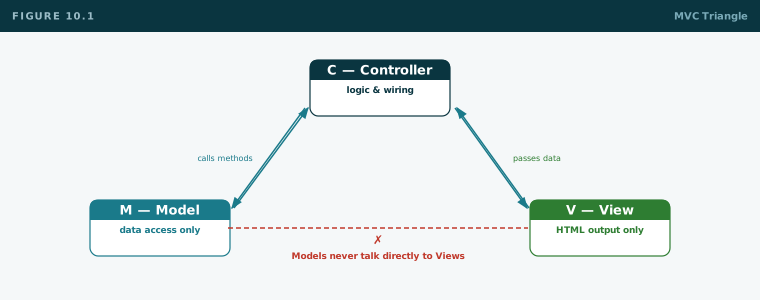
The one rule: each layer is forbidden from doing another layer's job. Break this and you're back to spaghetti.
MV2C — the two-way controller pair
M
Model — data access only
All DB access. Returns Response. Wrapped in try/catch. Never throws to caller.
V
View — HTML output only
Pure HTML output methods. No logic, no SQL, no session reads, no inline JS.
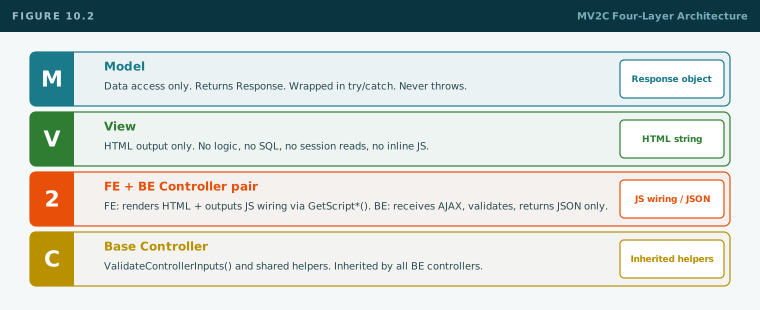
2
FE Controller + BE Controller — the pair
FE: renders HTML via View methods. Outputs JS wiring via GetScript* methods. Injects PHP/session values into JS. BE: receives AJAX, validates input, calls Model, returns JSON only. Never HTML.
C
Base Controller — helpers
ValidateControllerInputs and shared helpers. Inherited by all BE controllers.
Figure 10.1— MVC triangle: Model ↔ Controller ↔ View, with forbidden direct connections markedFigure 10.2— MV2C four-layer diagram: Page → FE Ctrl (View HTML + GetScript* JS) → Browser AJAX → BE Ctrl → Model → PDO
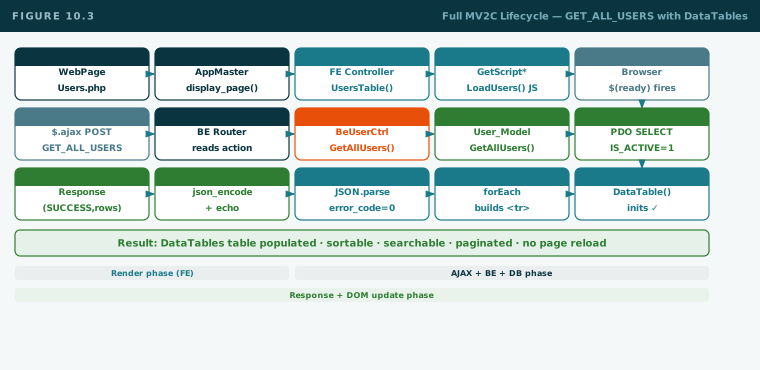
Full request lifecycle — GET_ALL_USERS with DataTables
flow
Page renders — Users.php (WebPage)
  ↓ FE Controller: UsersTable() outputs empty table HTML
  ↓ FE Controller: GetScriptUsersTable() outputs JS wiring incl. LoadUsers()

Browser: $(document).ready fires
  ↓ LoadUsers(): usersTable.destroy() + empty()
  ↓ AjaxCallHtmlV2 POST { action:"GET_ALL_USERS" }

BeUserController.php router reads action
  ↓ BeUserController::Instance()->GetAllUsers($input)
  ↓ User_Model::Instance()->GetAllUsers()
  ↓ PDO_Wrapper: SELECT ... WHERE IS_ACTIVE=1 AND DELETED=0
  ↓ returns Response(SUCCESS, $rows[])
  ↓ router: echo json_encode($response)

Browser receives JSON
  ↓ JSON.parse → error_code===0
  ↓ forEach builds <tr> rows → append to #users-tbody
  ↓ DataTable() initialised on populated table
  ↓ User sees sortable, searchable, paginated list
Figure 10.3— Full MV2C lifecycle for GET_ALL_USERS: WebPage → FE Ctrl → JS LoadUsers() → AJAX → BE Ctrl → Model → JSON → DataTables
✅Checkpoint 10
Can define M, V, C and the one separation rule
Can explain the "2" — FE controller (renders HTML + JS wiring) vs BE controller (JSON only)
Can trace GET_ALL_USERS from page load to DataTables populated, naming every file and method
← Play 9
Play 10 of 16
Play 11 →
Play 11 — Architecture
Gen 2 Building Blocks
Build the reusable kernel file by file. Every class here is used in every feature you will ever build on this stack.
Naming conventions
Type
Convention
Example
Classes
PascalCase
UserController, PDO_Wrapper
Public methods
PascalCase
GetAllUsers(), BuildResponse()
Private methods
_PrefixedPascalCase
_BuildCondition()
Variables
camelCase
$inputArgsArray, $idUser
Static constants
SCREAMING_SNAKE_CASE
$SUCCESS_CODE
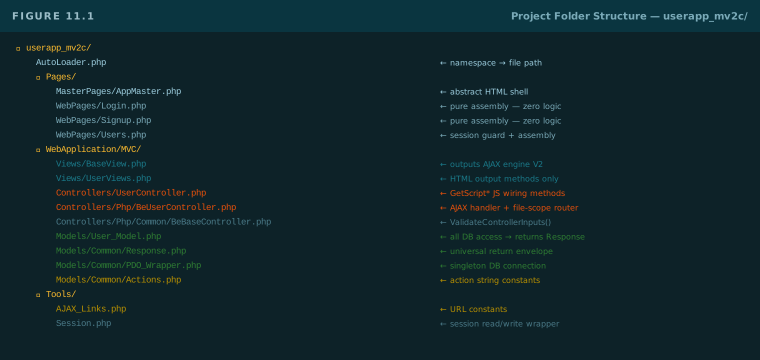
Figure 11.1— Annotated folder tree: full userapp_mv2c/ structure with each file's role labeled
Tasks — build the kernel
Task 11.1AutoLoader.php
Register spl_autoload_register that maps \ → / and appends .php. Test: use a namespaced class with zero require_once calls.
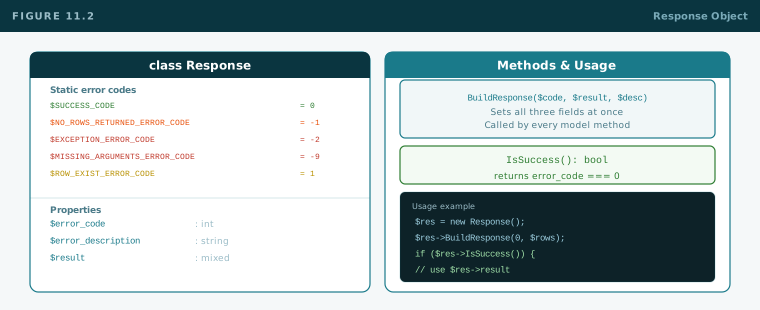
Figure 11.2— Response object: three fields, code table, BuildResponse(), IsSuccess()
Task 11.3PDO_Wrapper.php
Singleton. Private constructor creates PDO with all three options. Methods: select(), selectPrepared(), insertSingleObjectReturnLastId(), update().
Task 11.4Actions.php and AJAX_Links.php
Actions: static string constants for SIGNUP, LOGIN, GET_ALL_USERS, CHANGE_PASSWORD, DELETE_USER. AJAX_Links: static string constant for BE_USER_CONTROLLER path. Never use raw strings for these.
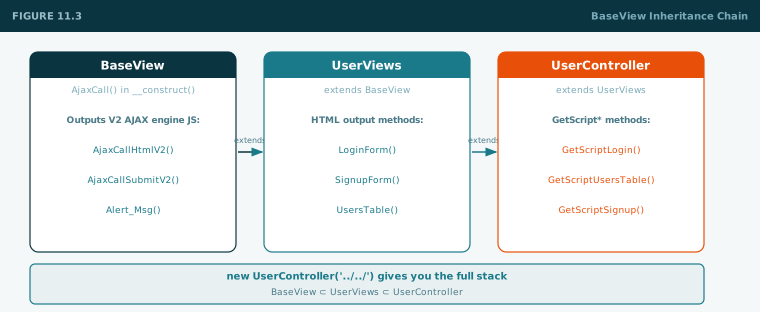
Constructor fires AjaxCall() which outputs inline <script> with V2 helpers: AjaxCallHtmlV2(), AjaxCallSubmitV2(), Alert_Msg(). V1 positional functions are legacy — never use for new code.
Figure 11.3— BaseView inheritance chain: BaseView → UserViews → UserController — one instantiation gives the full stack
✅Checkpoint 11
Autoloader loads a class by namespace with no require_once
Can explain the Response envelope and its error codes from memory
Know why PDO_Wrapper is a singleton
Know why Actions:: and AJAX_Links:: constants are used — never raw strings
Understand what BaseView::AjaxCall() outputs and what V2 means
← Play 10
Play 11 of 16
Play 12 →
Play 12 — The MV2C Build
Backend — Model & BE Controller
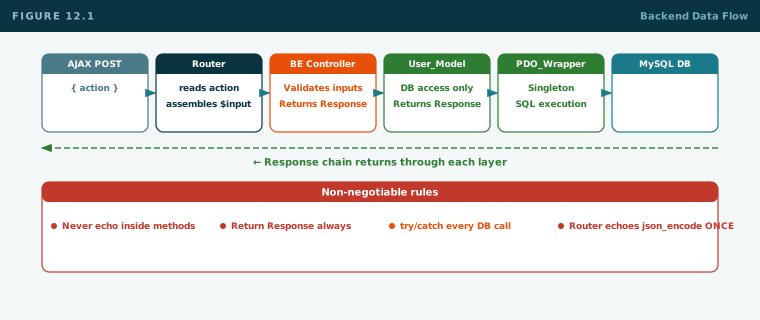
Every method returns Response. BE controller never echoes, never reads session inside a method. The file-scope router at the bottom handles both of those.
Non-negotiable backend rules
✗
Never echo inside a controller or model
Return Response. Router echoes json_encode once — only there.
✗
Never read $_SESSION inside a method
Auth identity assembled at router level, injected into $inputArgsArray.
✗
Never return raw data from a model
Every model method returns Response. Wrap all DB calls in try/catch.
✗
Never hard delete
UPDATE SET DELETED=1. Always. No exceptions. Ever.
Figure 12.1— Backend flow: router → BE ctrl validates → model queries PDO → Response chain back → router echoes JSON
Tasks
Task 12.1Base_Model.php
Empty base class. Shared model utilities grow here over time.
Task 12.2User_Model.php
Singleton extending Base_Model. Methods all return Response and are wrapped in try/catch: CreateUser() (duplicate check, ucwords, hash), GetUserByEmail(), GetAllUsers() (active filter, ordered), ChangePassword(), DeleteUser() (soft).
POST directly to BeUserController.php via Chrome Network tab: action=GET_ALL_USERS. Expected: {"error_code":0,"error_description":"","result":[]} (empty array until users exist). Then POST SIGNUP and re-test GET_ALL_USERS.
Task 12.5Xdebug on the backend
Breakpoint inside BeUserController::GetAllUsers(). POST the request. Step through: ValidateControllerInputs → User_Model::GetAllUsers() → PDO_Wrapper select → Response build → echo.
✅Checkpoint 12
Every model method returns Response wrapped in try/catch
BE controller validates, returns Response — no echo, no session reads inside methods
Router: only place that reads $_SESSION and calls echo json_encode
GET_ALL_USERS returns correct JSON when hit directly
← Play 11
Play 12 of 16
Play 13 →
Play 13 — The MV2C Build
Frontend, DataTables & AJAX
Views output HTML only. GetScript* outputs the JS wiring including LoadUsers(). DataTables must be destroyed before rows are rebuilt. This is the play where everything from Plays 3–5 comes together.
Non-negotiable frontend rules
✗
Views are HTML only
No logic, no SQL, no session reads, no inline <script> in View methods.
✗
PHP values injected only in GetScript*
Session values, BE URLs, action constants — injected at render time inside GetScript* only.
✗
V1 AJAX functions forbidden in new code
Use AjaxCallHtmlV2 and AjaxCallSubmitV2. V1 is legacy — never use for new code.
✗
Never bind directly to dynamic elements
Delete and Change PW buttons are built by JS. Always event delegation.
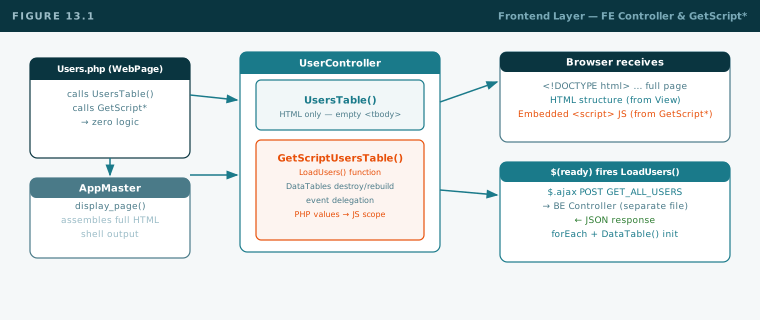
Figure 13.1— FE layer: WebPage calls UsersTable() (→ empty table HTML) + GetScriptUsersTable() (→ LoadUsers JS). AppMaster assembles full page.
GetScriptUsersTable — the key method
php
public functionGetScriptUsersTable(): void {
$beUrl = $this->rootpath . AJAX_Links::$BE_USER_CONTROLLER;
// PHP session value injected into JS scope here only:$loggedId = Session::read("logged_user")["id"] ?? -1;
?>
<script>
// BE URL and session values available to all JS below:var BE_USER_URL = "<?php echo $beUrl; ?>";
var LOGGED_ID = <?php echo $loggedId; ?>;
var usersTable = null;
$(document).ready(function() { LoadUsers(); });
functionLoadUsers() {
if (usersTable) { usersTable.destroy(); $("#users-tbody").empty(); }
AjaxCallHtmlV2({
url: BE_USER_URL,
data: { action: "<?php echo Actions::$GET_ALL_USERS; ?>" },
GetResponse: function(data) {
var result = JSON.parse(data);
if (result.error_code !== 0) { Alert_Msg(result.error_description, 2); return; }
var n = 1;
result.result.forEach(function(u) {
$("#users-tbody").append("<tr><td>"+n+++"</td><td>"+u.FULL_NAME+"</td>..."+
"<td><button class='btn btn-danger btn-sm btn-delete' data-id='"+u.ID+"'>Delete</button></td>"+
"</tr>");
});
usersTable = $("#users-table").DataTable({ pageLength:10, order:[[1,"asc"]] });
}
});
}
$("#users-tbody").on("click",".btn-delete",function() {
var id = $(this).data("id");
if (!confirm("Delete?")) return;
AjaxCallHtmlV2({ url:BE_USER_URL, data:{action:"<?php echo Actions::$DELETE_USER;?>",id_user:id},
GetResponse:function(data){
if(JSON.parse(data).error_code===0){ Alert_Msg("Deleted.",1); LoadUsers(); }
}
});
});
</script>
<?php
}
Tasks
Task 13.1UserViews.php
Extends BaseView. Methods: LoginForm(), SignupForm(), UsersTable() (empty tbody, Change PW modal), HTML only. Form actions use AJAX_Links::. Hidden action inputs use Actions::.
Task 13.2UserController.php — GetScript* methods
Extends UserViews. Methods: GetScriptLogin(), GetScriptSignup() (password match + V2 submit), GetScriptUsersTable() (LoadUsers with DataTables destroy/rebuild, Delete delegation, Change PW modal). All V2, all check error_code.
Task 13.3AppMaster.php and WebPages
Abstract AppMaster: display_page() outputs HTML shell with set_page_links() in head, set_main_content(), then scripts, then set_page_scripts(). Login.php, Signup.php, Users.php each extend AppMaster. Users.php checks session and redirects if not logged in.
Task 13.4Full end-to-end verification
Open Signup.php → create account → AJAX call in Network tab, no page reload
Login → session set, redirect to Users.php
Users page → DataTables populates via AJAX on load
Sort by name, search, paginate — DataTables controls work
Delete a user → table refreshes in place via LoadUsers() — no page reload
Change PW modal → closes on success
✅Checkpoint 13
Views are HTML-only — zero JS, zero logic, zero session reads
PHP values (BE URL, session ID) injected into JS only in GetScript* methods
LoadUsers() destroys old DataTables instance before rebuilding rows
Delete uses event delegation; table refreshes in place with no page reload
All AJAX uses V2 functions and checks error_code
Network tab shows GET_ALL_USERS POST and JSON response on every LoadUsers() call
← Play 12
Play 13 of 16
Play 14 →
Play 14 — Validation
New Action Challenge
No code is provided. You receive the spec and constraints. You design and build every layer on your own. This is how we know if you've absorbed the playbook.
No code provided in this play. Spec and constraints only. Design and build every layer yourself.
The feature
Reactivate a deleted user.
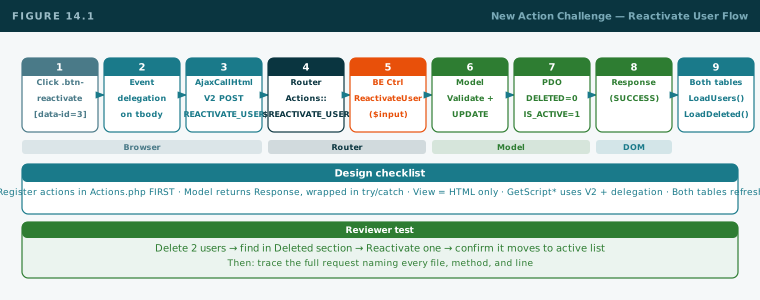
Add a "Deleted Users" section to the Users page. It shows all users where DELETED = 1. Each row has a "Reactivate" button. Clicking it sets DELETED = 0 and IS_ACTIVE = 1. The user disappears from the deleted list and reappears in the active list. Both tables refresh via their own LoadUsers() and LoadDeletedUsers() calls.
What you must touch
Layer / File
What you add
Actions.php
Register GET_DELETED_USERS and REACTIVATE_USER constants first
User_Model.php
GetDeletedUsers(): Response and ReactivateUser(int $id): Response
BeUserController.php
Two new methods + two new router case blocks using Actions:: constants
UserViews.php
DeletedUsersTable(): void — HTML only, empty tbody
Figure 14.1— Reactivate flow: button → AjaxCallHtmlV2 → router REACTIVATE_USER → model UPDATE DELETED=0,IS_ACTIVE=1 → both tables refresh
Answer these before writing a line of code — submit to reviewer first
Pre-taskFive design questions
What SQL does ReactivateUser run? Write the exact UPDATE statement.
Which file do you modify first, and why?
Why must the Reactivate button use event delegation?
If you skip registering the action in Actions.php and use a raw string in the router — what breaks and how do you debug it?
After reactivation succeeds, what should the FE do to both tables?
Your reviewer will: delete two users, find them in the Deleted section, click Reactivate on one, confirm it moves to active, then ask you to trace the full request from button click to both tables refreshing — naming every file and method.
✅Checkpoint 14
Written answers to all 5 design questions approved by reviewer before coding begins
Actions.php has both new constants registered first
Model methods return Response, wrapped in try/catch
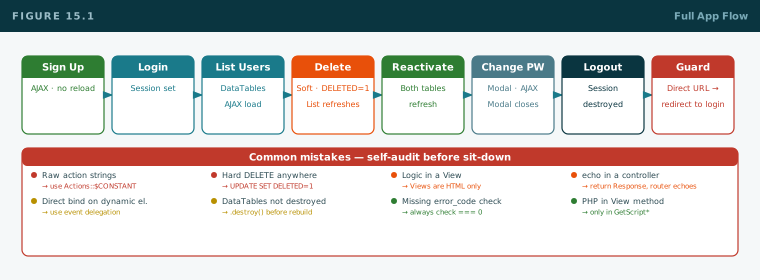
BE controller router has two new case blocks using Actions:: constants